Software Supply Chain Attack via the Official SoftwareOK Website: Tampering with Q-Dir and DesktopOK Installation Files

1. Overview
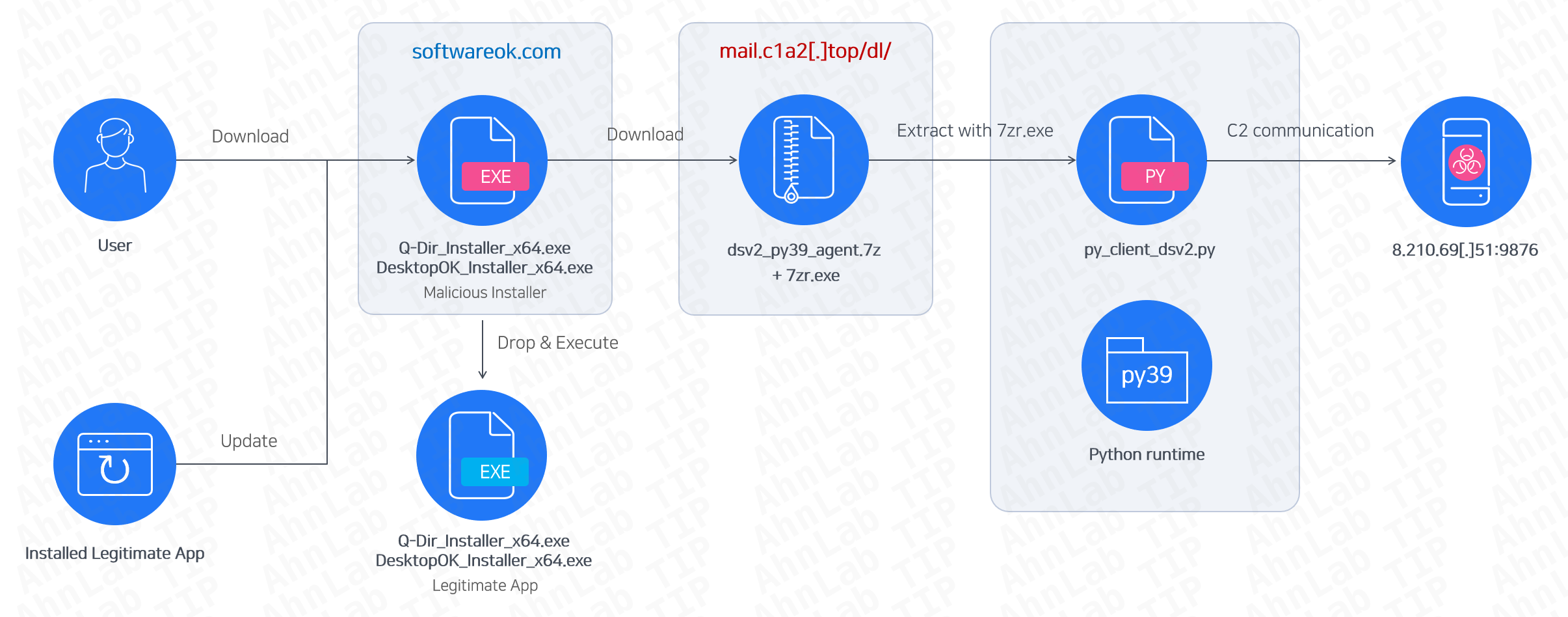
AhnLab SEcurity intelligence Center (ASEC) recently confirmed that some Q-Dir and DesktopOK installation files distributed on the official SoftwareOK website had been tampered with to contain malicious files. Evidence indicates that malicious files were generated not only when users downloaded the programs directly from the official download page but also during the update process of previously installed legitimate programs.
The malicious installation files make it difficult for users to detect malicious activity by running the legitimate Q-Dir or DesktopOK, while simultaneously downloading and installing Python-based remote control malware (RAT) from an external server. Once installed, the RAT can perform malicious actions—such as executing shell commands and Python code execution, sending and receiving files, taking screenshots, and collecting system information—based on the threat actor’s commands. Therefore, users who are currently using Q-Dir or DesktopOK, or who have recently installed or updated these programs, should verify the hash values of the downloaded files and check their systems for any traces of RAT installation or execution.
[Figure 1] Attack Flowchart
2. Tampering with Installation Files
[Figure 2] Valid SHA-256 Hash
SoftwareOK is a software distribution site that offers various free Windows utilities, such as Q-Dir, DesktopOK, and WinScan2PDF. In this case, the malicious file was delivered to users through SoftwareOK’s official distribution path, not through unofficial repositories or advertising pages. This constitutes a software supply chain attack that exploits users’ trust in legitimate software and official distribution paths.
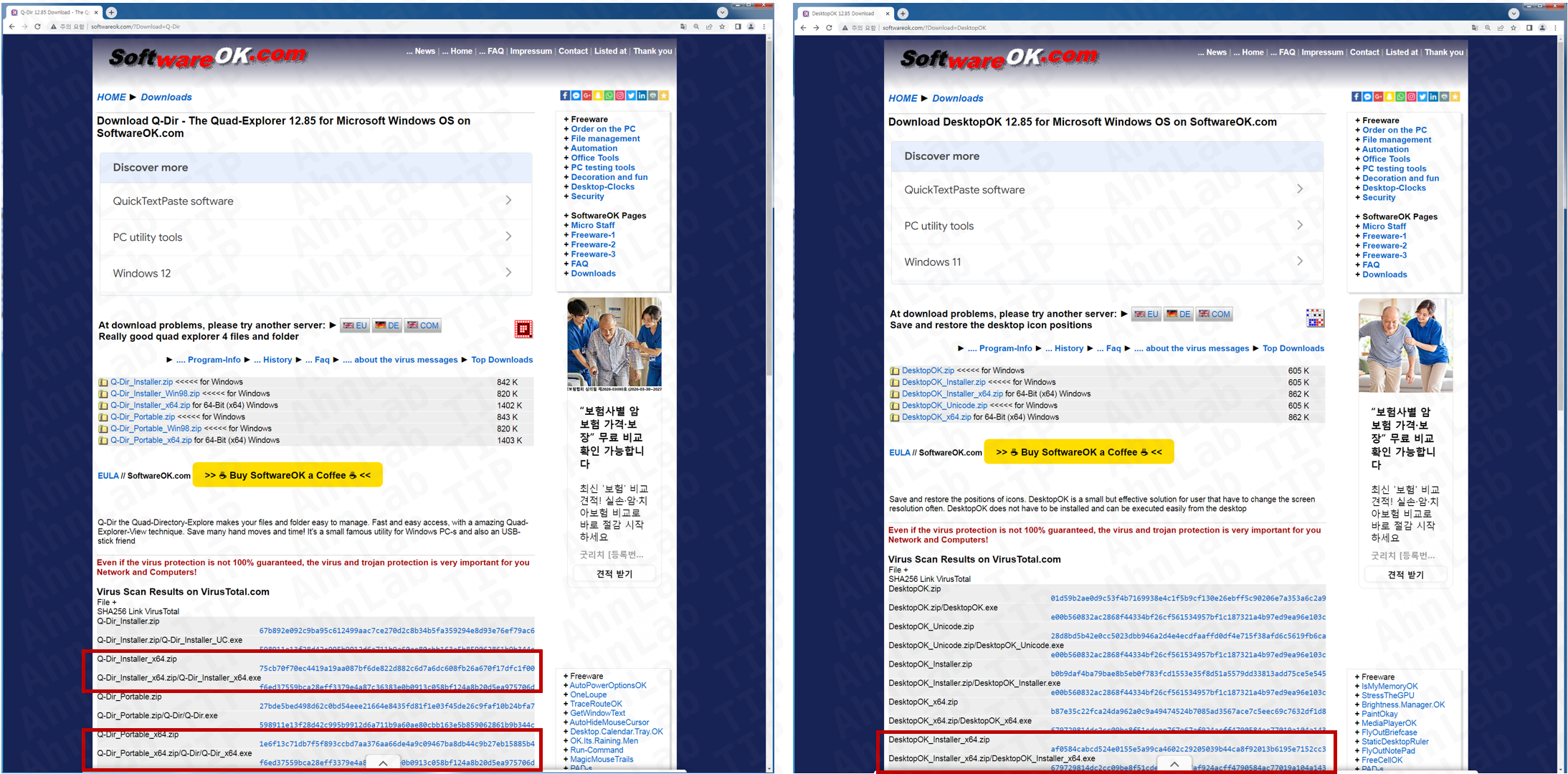
At the time of analysis, the SHA-256 hashes of some installation files downloaded from the official SoftwareOK website did not match the hash values posted on the download page. Furthermore, the files actually distributed were found to contain code that triggered additional file downloads and automatic execution—features unrelated to the legitimate program’s functionality. This was confirmed through the integrity between the hash information posted on the official page and the actual distributed files, which had been compromised. The SHA-256 hashes of the verified legitimate and malicious installation files are as follows.
| Product and Version | Legitimate Hash (SHA-256) | Malicious Hash (SHA-256) |
|---|---|---|
| Q-Dir 12.85.0.0 | F6ed37559bca28eff3379e4a87c36383e0b0913c058bf124a8b20d5ea975706d | 434B67dd403c74752b336fbb4fc94ee3a6fb615168e3fd31baea71d1a356ecd8 |
| 8Ac6901a941788ab9675a9ec9bebdbc00074cb76f19a7d84c2e1b0ddbcee4f48 | ||
| Q-Dir 12.84.0.0 | 0A7a00ec5844cb80ecc6d210d7c0a8c3f44f3a5b138146101b0c534f15d8fabf | Cf9e2433540d0b8ae8c9f4c9d5f11770343d413c1cfb201c5edae7155f88585a |
| D1a2cf8882c254156848f4a12b6c6837a3cf0e460f876c6f8b00d32a1560640a | ||
| 7Afa1e77c115eaa7798237039fde67c8a69686e7d9a4034a8df54aff2d1a126d | ||
| 1B7b7947527a05f0fae268b16894440549c2dd512d421a06960e27b5fb1d5fa0 | ||
| Q-Dir 12.83.0.0 | Fc2993e6ad8cd9f82d56d7107018e0a77c90f66d4ba208b15f9fed5cd4609910 | C41bd9eefd7a63fa329b24144a3483abac012ebc11bd5606b6c8295251d46422 |
| 551E5744b24019f016f9ee8dd3a2c00429da587b20321abaef55c18c0a655a5d | ||
| 7524Fcf3ffc44fc2e9a53af761c2a308edac31d02df3dfb1a4b57504243aec48 | ||
| B45ba4a1d9a25116b94e95ef48d63fffda7d77bd358d17d74c7575ce39986b84 | ||
| DesktopOK 12.85.0.0 | 679729814Dc2cc09be8f51cdeee767e67af924acff4790584ac77019a104a143 | C12651f2988bb5e05afd1f4b1e6bce618111a4703f1aadc006bfacc6ac7e1d90 |
| F96cab94d9f0e0000dfef8b9fce16bcefd23679443cc8ba8f7811a55ea5799ec | ||
| DesktopOK 12.82.0.0 | 68360F3a515f024a990b17ba96066b27333fe360a0e3e32b88ded9e4c23e5dd7 | 8C172c421129bda890b504e89d1bb72af477be9896b22a576920c050442b4a04 |
| 5B43284e48edee4acbab49bc5a68eb21d3a369a058d859689b6a5dd2042a5e2a | ||
| Bdbbe28cde3dee061536e524bc2a14316015db0c958cad83023790d32a4f8d99 | ||
| 393D2f9f05affa88aaa19f29f041d28fe5c3e1fc2fd84c76d1e2f1aa6da74a83 | ||
| Ff4ec1cca4746e33d1205ed434e1e2ac9cee71fec477b032f56d3bde577626d2 |
[Table 1] Legitimate and Malicious Hashes (SHA-256)
Versions confirmed to have been replaced with malicious files to date include Q-Dir versions 12.85.0.0, 12.84.0.0, and 12.83.0.0, as well as DesktopOK versions 12.85.0.0 and 12.82.0.0. Even if your version does not match those listed, users who installed or updated these programs during the period when the malicious files were distributed should be aware of the risk of infection.
In particular, logs showing that malicious files were generated even during the update process of previously installed legitimate programs have been identified. Therefore, not only users who downloaded the affected versions directly from the official websites but also those who used the update features of their existing Q-Dir or DesktopOK installations may have been affected. The specific cause and path of the legitimate installation files being replaced with Malicious Files have not been identified.
3. Malicious Installation Files and Python RAT
The malicious installer runs the legitimate Q-Dir or DesktopOK to lower the user’s suspicion, while simultaneously downloading and installing a Python RAT package from an external server. The overall process is as follows.
[Figure 3] Legitimate executable file embedded within the malicious file
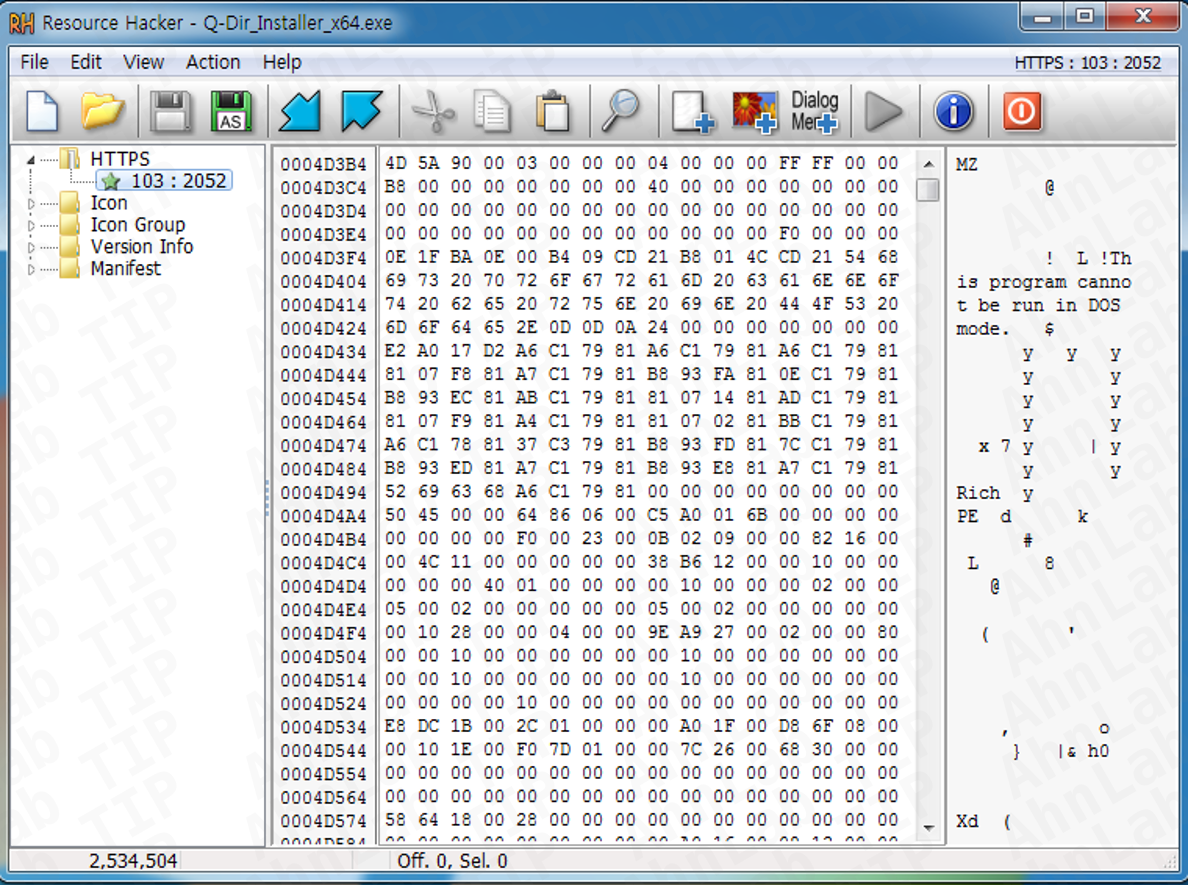
The malicious installer contains legitimate Q-Dir or DesktopOK executables as internal resources. The legitimate executables embedded within matched the SHA-256 hashes published on the official download page, and a valid digital signature from the developer, Nenad Hrg, was also verified.
When the malicious installer is executed, it creates and runs the legitimate program embedded within it at the following Path. Since Q-Dir or DesktopOK appears to run normally on the user’s screen, it is difficult for the user to recognize that the installer has been tampered with.
- C:\Users\Public\[file name]
It then connects to an external server to download a tool to decompress archives and a Python RAT package.
| Download URL | Functionality |
|---|---|
| Hxxps://mail.c1a2[.]top/dl/7zr.exe | Legitimate 7-Zip tool to decompress files |
| Hxxps://mail.c1a2[.]top/dl/dsv2_py39_agent.7z | Package containing a Python runtime environment and a RAT |
[Table 2] Download URLs and Functions
Although the downloaded 7zr.exe is a legitimate 7-Zip tool to decompress files, threat actors use it to decompress the RAT package downloaded alongside it. The RAT package is installed by default in the “C:\ProgramData\Microsoft\DeviceSync\b2” directory. If that path is unavailable, an alternative path such as “C:\ProgramData\DeviceSync\b2” is selected. The RAT package includes a Python runtime environment. Therefore, it can execute malicious Python scripts even if Python is not installed on the infected system.
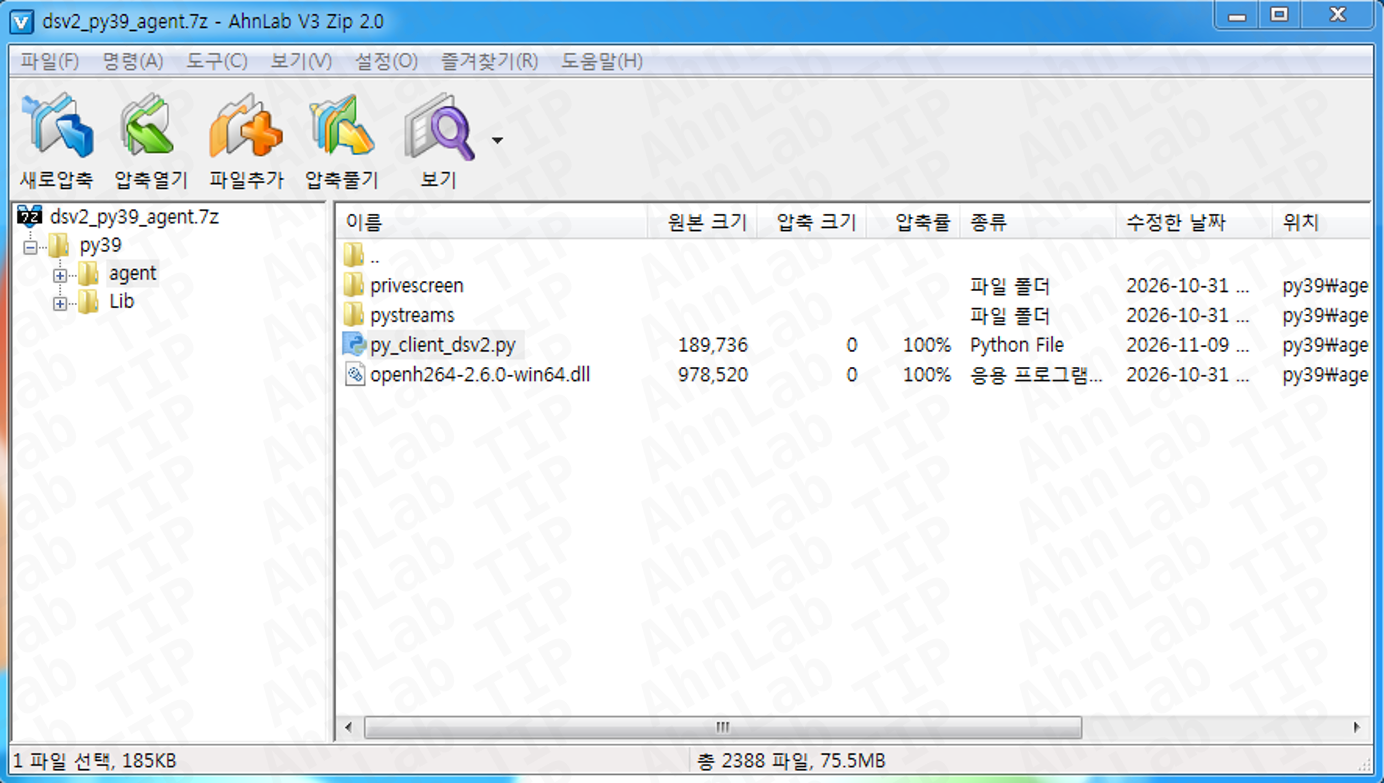
[Figure 4] Package containing the Python RAT
The malware ensures persistence by registering a scheduled task named “\UPnp\MicrosoftEdge_dcntel.” The registered scheduled task executes the Python RAT through the Python interpreter as follows:
- “[Installation Path]\py39\pythonw.exe” “[Installation Path]\py39\agent\py_client_dsv2.py”
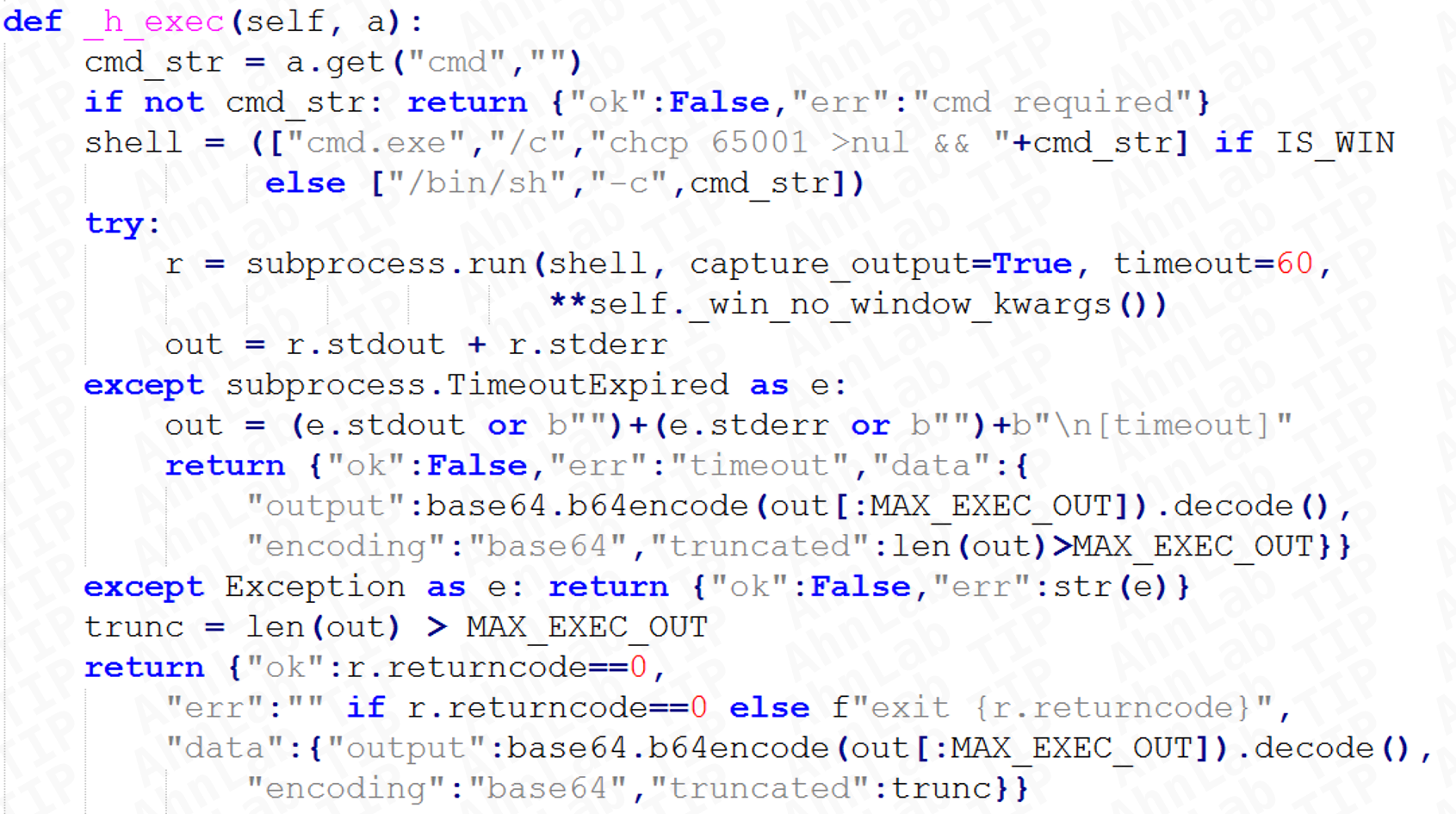
[Figure 5] Command execution code
The installed Python RAT communicates with the following C2 server and executes commands sent by the threat actor.
- C2: 8.210.69[.]51:9876
The threat actor can remotely control the infected system or execute additional malware through the RAT. Additionally, since the threat actor can access the system’s screen and files, there is a risk that work-related data, account information, and other sensitive information may be exposed. The confirmed key functions are as follows.
- Shell command execution
- Python code execution
- File upload and download
- Capturing user screenshots
- Collection of operating system and system information
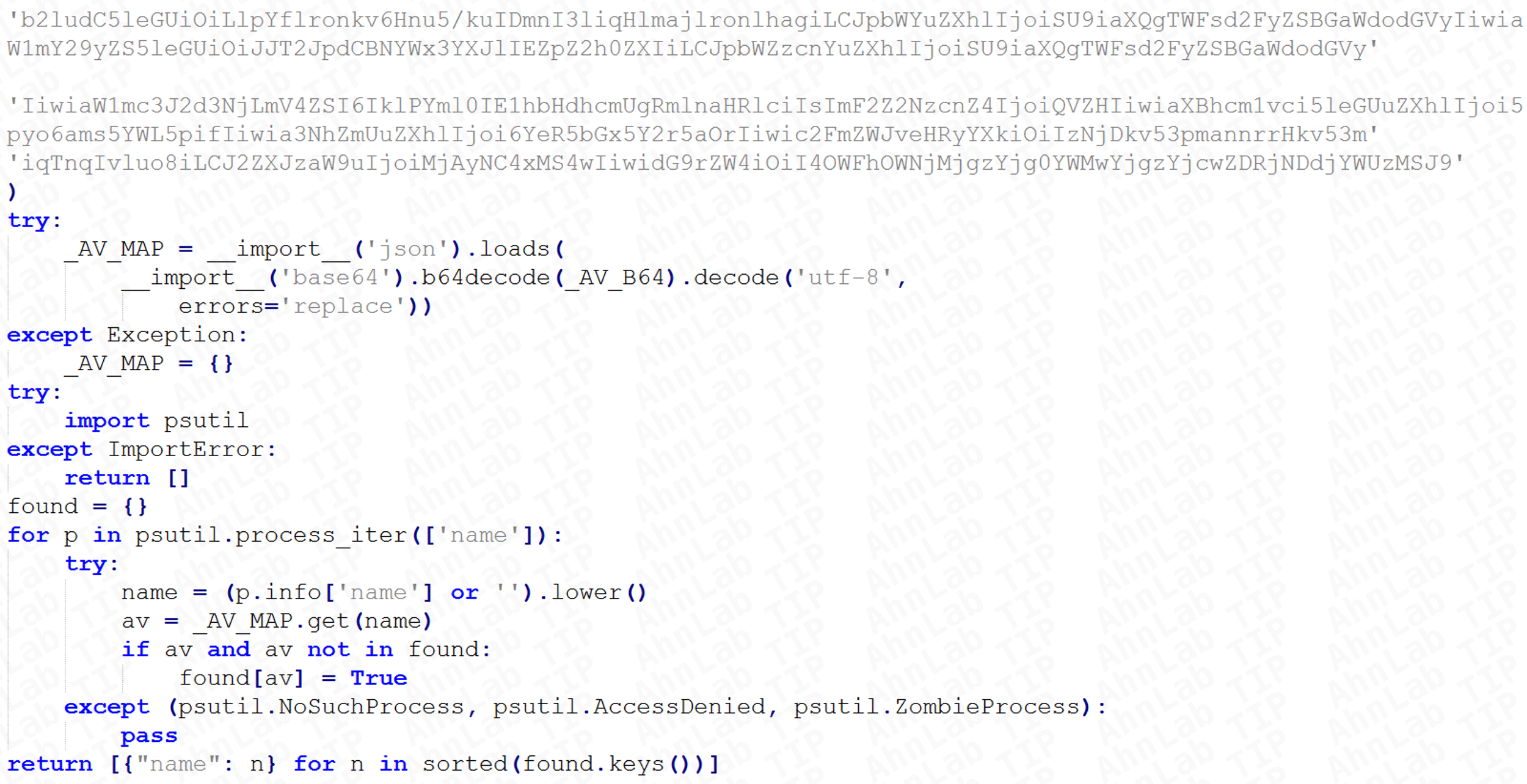
[Figure 6] Security Product Identification Codes
It also collects a list of running processes and compares it with an internal list of security product identifiers to identify which security products are running on the infected system. This list contains a total of 1,206 process names and includes various Korean & Global antivirus and EDR products. The main targets for identification are as follows.
- Korean security products
: AhnLab V3, ESTSecurity ALYac, INCA Internet nProtect, Hauri ViRobot, SGA Solutions VirusChaser - International security products
: CrowdStrike Falcon, SentinelOne, Cylance, Trend Micro, Avast, McAfee, ESET, Symantec, Kaspersky, Bitdefender, Sophos, Fortinet, Elastic Security, Cybereason, Malwarebytes, FireEye
Information on the identified security products is transmitted to the C2 server. Threat actors can use this information to assess the security environment of the infected system, decide whether to carry out follow-up attacks, or evade detection by security products.
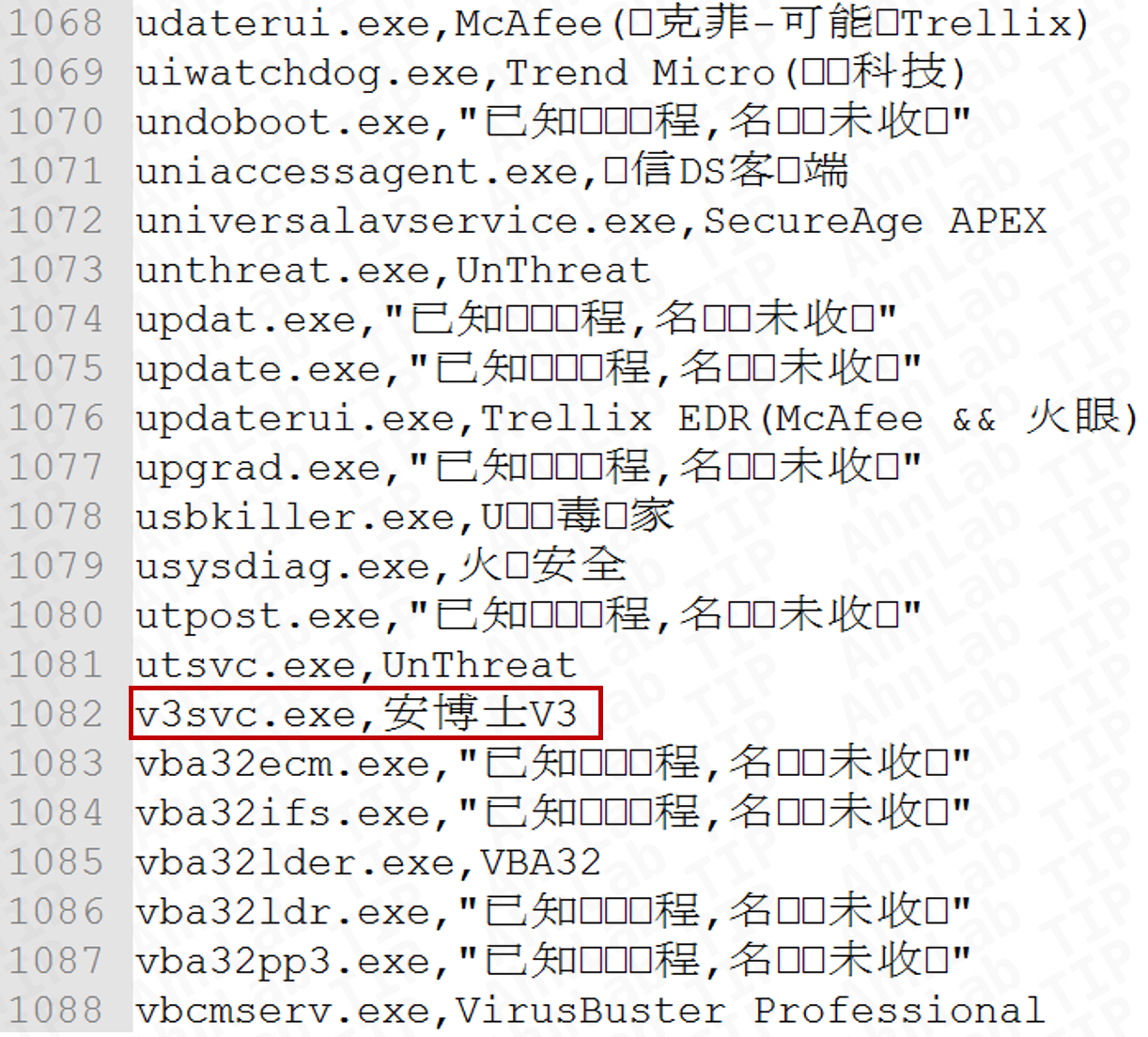
[Figure 7] List of Identified Security Products
Additionally, evidence of Chinese language use was found in comments within the Python code and in the list of identified security products. This suggests that the malware developers or threat actors may be associated with a Chinese-speaking environment.
4. Conclusion
This case is a software supply chain attack that exploited users’ trust in the SoftwareOK official website and the update process for legitimate programs. Since supply chain attacks utilize legitimate software and official distribution channels as attack vectors, it is difficult for users to determine whether a file is infected based solely on its appearance or the program’s execution results. Particular caution is required, as users may be exposed to malicious files not only when downloading installation files directly from official websites but also when using the update feature of already installed legitimate programs.
Users currently using Q-Dir or DesktopOK should uninstall the existing program and reinstall the latest version, which has been verified as safe. Before reinstalling, users must verify that the SHA-256 hash posted on the official download page matches the hash of the file they actually downloaded.
However, simply uninstalling and reinstalling the program may not remove a Python RAT that has already been installed. Therefore, you should also check for suspicious Python execution environments, scheduled tasks, related files, and traces of external network communication, update your antivirus engine to the latest version, and then perform a full system scan. If indicators of infection are confirmed, the affected system must be isolated from the network, and the extent of the system compromise—including whether additional malware has been executed or data has been leaked—must be assessed.
Software developers and distribution site operators must perform code signing and hash verification throughout the entire process—from build to deployment—and maintain persistence in verifying that the integrity of the final files delivered to users is maintained. In particular, they should periodically verify that the hashes posted on official pages match those of the actual files that were downloaded and monitor for abnormal changes to distribution files and download requests to prepare for similar supply chain attacks.