


Case of Injection Attack Using Legitimate MS Utility mavinject.exe

1. Overview
Mavinject.exe is a legitimate utility provided by Microsoft. It is used to inject DLLs into specific processes in an Application Virtualization (App-V) environment. It has been included in the operating system by default since Windows 10 version 1607, and it is a trusted executable file signed by Microsoft. As a result, most security solutions tend to include this process in their list of trusted applications (whitelist).
Threat actors exploit this vulnerability to inject a malicious DLL payload into a legitimate process using mavinject.exe.

Figure 1. Attributes and certificate information of the mavinject.exe file
This technique is categorized as follows in MITRE ATT&CK.
- T1218.013 – Signed Binary Proxy Execution: Mavinject
- https://attack.mitre.org/techniques/T1218/013/
2. How It Works
mavinject.exe is implemented to automate the traditional DLL injection technique. The following are the key Windows APIs called internally when it runs:
- OpenProcess: Retrieves a handle to the target process, requiring the PROCESS_VM_OPERATION, PROCESS_VM_WRITE, and PROCESS_CREATE_THREAD permissions.
- VirtualAllocEx: Allocates memory in the virtual memory space of the target process.
- WriteProcessMemory: Writes the DLL path to the allocated memory space, completing the loading preparation.
- CreateRemoteThread: Creates a new thread and calls the LoadLibraryW function, which loads and executes the DLL.
While these actions may appear to be part of regular Windows system tasks, threat actors can achieve both external code execution and bypassing detection.
Note that Mavinject.exe can only be used in environments where the App-V feature is activated (Windows 10 1607 or later). Additionally, some security solutions detect the malware based on the activation status of App-V.
3. Example of how it is run
1) DLL Injection (/INJECTRUNNING)
This method is commonly used to inject malicious DLLs into a running normal process.
mavinject.exe <PID> /INJECTRUNNING <DLL path>
- <PID>: The Process ID of the target process
- <DLL Path>: The full path of the DLL file to be injected
Below is an example of injecting a DLL file using mavinject.exe to execute the Windows Calculator program (calc.exe) in the Notepad process (notepad.exe).
mavinject.exe 3812 /INJECTRUNNING c:\test\run_calc.dll
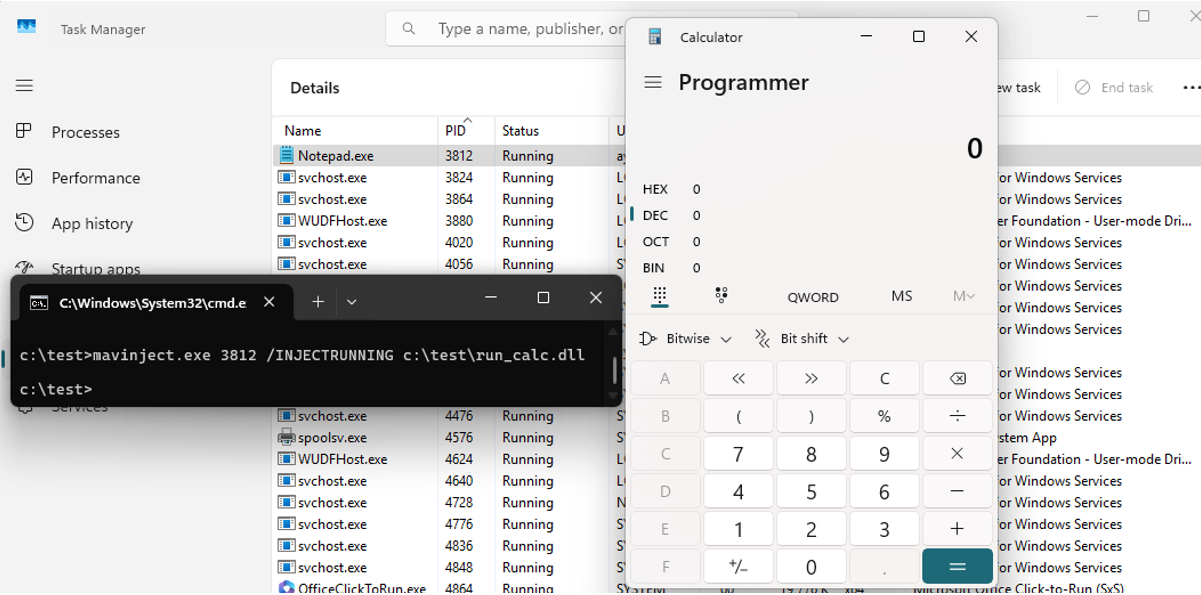
Figure 2. Injection example
At this point, the thread running the calculator operates within the legitimate notepad.exe process. If a malicious DLL is injected to perform actions such as downloading malware or connecting to a C&C server, it would appear as if the Notepad process is performing these actions. Even when checking the process tree structure, the topmost process is mavinject.exe (legitimate), making it possible to evade detection by most EDR products that flag this behavior as suspicious. Threat actors take advantage of the difficulty in detecting suspicious behaviors of normal processes.
mavinject.exe can target DLLs that exist in NTFS Alternate Data Stream (ADS) paths in addition to regular DLL files.
For example, the hidden_dll data (DLL) created in the test.txt file as an ADS stream can also be specified as a target for injection. This can be used to bypass normal file detection logic.

Figure 3. DLL injection example created by ADS
For cases of malware attacks abusing ADS, refer to the following post.
2) DLL Import Table-Based Injection (/HMODULE)
mavinject.exe <PID> /HMODULE=<Base Address> <DLL Name> <Ordinal Number>
- <PID>: Process ID of the target process
- <Base Address>: Base address of the module loaded in the target process
- <DLL Name>: Name of the DLL to be imported
- <Ordinal Number>: Ordinal index of the export function to be called
This method involves manipulating the executable’s Import Address Table (function reference table) to directly call a specific function in an external DLL. Users can explicitly specify the location information of the DLL to be injected and its functions, allowing for more precise control.
4. Attack Cases
The following are cases where mavinject.exe was actually exploited in attacks.
Case 1: Injection of Earth Preta (Mustang Panda)’s waitfor.exe
According to Trend Micro’s research, Earth Preta (Mustang Panda), an APT group known to be supported by the Chinese government, carried out a new attack campaign using mavinject.exe.
Threat actors successfully gained the initial access to the target system through a phishing email and distributed a compressed file containing the legitimate OriginLegacyCLI.exe and the malicious EACore.dll to the user. If the ESET antivirus process is running on the target system, the threat actors inject the malicious DLL into the normal waitfor.exe process.
The reason for selecting mavinject.exe is clear. It is a legitimate utility signed by a Microsoft certificate, making it easy to bypass detection by security solutions. It can also disguise the injection behavior within the system as normal. Threat actors exploited these characteristics to secretly activate the backdoor, establish a structure that can maintain communication with the C2 server, and execute commands.
Case 2: Lazarus Group’s explorer.exe Injection Technique
Lazarus is a threat group that mainly uses document-based malware distribution techniques. In this case, the threat actor gained initial access through a document containing a malicious macro. The script executed through the document downloads the malicious payload from an external source and then uses mavinject.exe to inject a malicious DLL into explorer.exe.
The explorer.exe process is often given a low sensitivity by security solutions because it is central to the Windows user environment. Injecting through mavinject.exe takes advantage of this characteristic, making it less likely to be detected. Therefore, it can be assumed that this attack was designed to bypass behavior-based detection systems by taking the form of injection through a legitimate process.

Figure 4. Earth Preta (Mustang Panda) – Attack flowchart
5. Detection and Response Measures
5.1. Detection Method
- Detects the execution of mavinject.exe from the command line and the arguments (/INJECTRUNNING, /HMODULE)
- Monitoring of the OpenProcess, VirtualAllocEx, WriteProcessMemory, and CreateRemoteThread call patterns in Sysmon, EDR, etc.
- Traces the LoadLibraryW call path and identifies anomalies
5.2. Response Measures
- Policy applied to block the execution of mavinject.exe When App-V feature is not in use
- Establishment of a rule to detect inter-process DLL injection
- Regularly check the abnormal DLL loading history of a normal process in the system
6. Conclusion
mavinject.exe is a legitimate tool included in the Windows operating system, but threat actors can use it as a valid means to bypass detection. The fact that APT groups such as Earth Preta and Lazarus are utilizing this tool to perform sophisticated injections shows that even legitimate tools can be part of threat actors’ tactics.
Security managers should consider the possibility of these system utilities being used as part of an attack chain and design detection strategies and response policies. In the end, the key to advanced threat response is identifying the “abnormal activities that appear normal.”


