Emotet Being Distributed Again via Excel Files After 6 Months

Over multiple blog posts, the ASEC analysis team has released information on the distribution of Emotet which had been modified in many different ways.
It has recently been identified that the Emotet malware has become active again. Around six months have elapsed since the last active distribution. This post will examine the differences between the current Excel file and the one that had been distributed in the past.


The common characteristics include the fact that it is distributed through an attachment on random emails, and that it disperses and hides multiple formulas with white text in the Excel sheet before hiding the sheet. An interesting point is that the recently distributed Excel files have some different characteristics from the files that have been distributed until now, which we will go over one by one below.
- A different method to prompt users to enable cell macro
A change has been made to the previous method which had directly induced users to enable cell macro. In the past files identified, Emotet used the message below to lead users to press the ‘Enable Content’ button. Now, it advises the user to copy the Excel file into the Microsoft Office Templates folder before relaunching it (See Figure 4).
It abuses the fact that the Templates folder is considered a trusted location according to Microsoft Office policy, which means that the macro is run immediately without a security warning.
[Previous]
- Click “Enable Editing” from yellow bar above.
- Most features are disabled. To view and edit document click Enable Editing and click Enable Content.
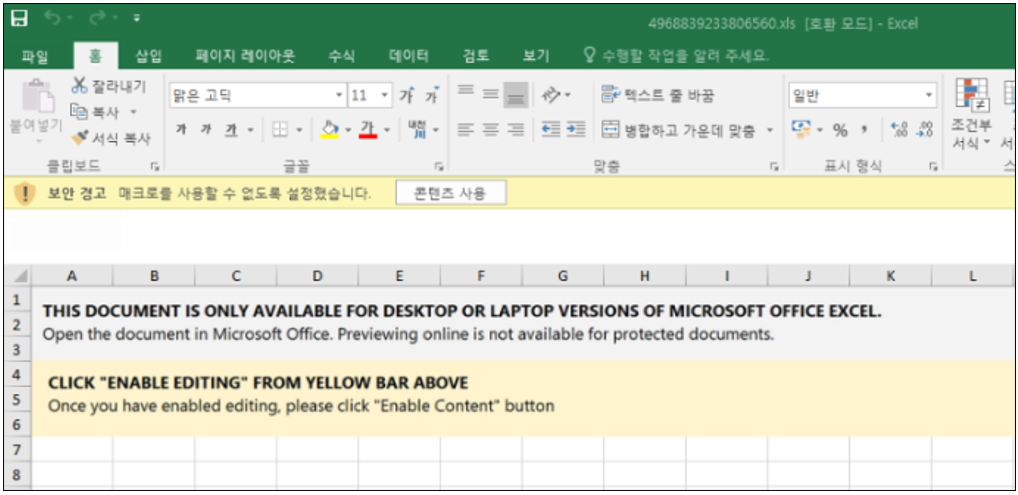
[Present]
- RELAUNCH REQUIRED
In accordance with the requirements of your security policy, to display the contents of the document, you need to copy the file to the following folder and run it again.for Microsoft Office 2013 x32 and earlier – C:\Program Files\Microsoft Office (x86)\Templates
for Microsoft Office 2013 x64 and earlier – C:\Program Files\Microsoft Office\Templates
for Microsoft Office 2016 x32 and later – C:\Program Files (x86)\Microsoft Office\root\Templates
for Microsoft Office 2016 x64 and later – C:\Program Files\Microsoft Office\root\Templates

2. Addition of sheet protection feature
The threat operator dispersed and hid formulas in the sheet to use formula macro before hiding the sheet, and additionally undertook a sheet protection measure for the hidden sheet so that the user cannot view the included formula macro.

Our analysis showed that the password to disable sheet protection is ‘AABABAAABBB^‘. When the sheet protection is disabled, the dispersed and hidden data is found within the sheet, as in the previous cases. It is likely that this measure was taken to avoid analysis and detection of data within the sheet.
3. Changes to the execution method of Emotet binary
From executing the DLL file (Emotet binary) saved with an .ocx file extension through rundll32.exe, it switched to the method of executing a DLL file with an .ooccxx file extension through regsvr32.exe.
- C:\Windows\System32\regsvr32.exe /S .. \oxnv1.ooccxx
- C:\Windows\System32\regsvr32.exe /S .. \oxnv2.ooccxx
- C:\Windows\System32\regsvr32.exe /S .. \oxnv3.ooccxx
- C:\Windows\System32\regsvr32.exe /S .. \oxnv4.ooccxx
Users must update V3 to the latest version and refrain from opening document files from unknown sources.
[File Detection]
– Downloader/MSOffice.Generic (2022.11.04.00)
– Trojan/Win.Emotet.R532802 (2022.11.04.01)
– Malware/Win.Generic.C5291114 (2022.11.04.03)
[Behavior Detection]
Execution/MDP.Behavior.M3638